Everything I build,
in one place.
I'm Takuto, and I design, build and run all of this on my own — a few phone apps for iPhone and Android, one Mac app, a web service, and a blog. This page is the complete list, not a selection.
Most of it is made for Japan: the apps are published on the Japanese App Store and Google Play, and unless the card says otherwise, they're in Japanese only.
- iOS
- Android
- macOS
- Web
Takuto Lab in figures
Mobile apps
9 iOS & Android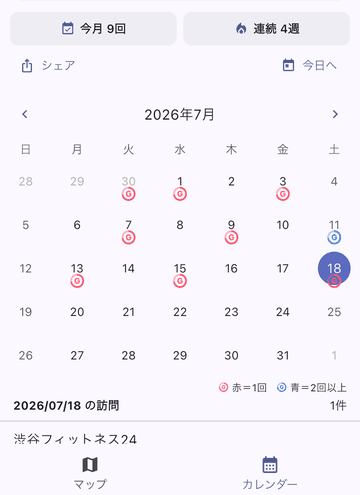
GymStamp
ENGLISH & JAPANESEKeeps count of how often you actually get to the gym. Press the button while you're there and a stamp lands on the calendar, so the streak is something you can see rather than guess at. It works with any gym — a big chain or the small place round the corner — and every record stays on your phone.
- Press the button while you're at the gym
- Stamps build up on the calendar
- Records never leave the phone
Hikazoe
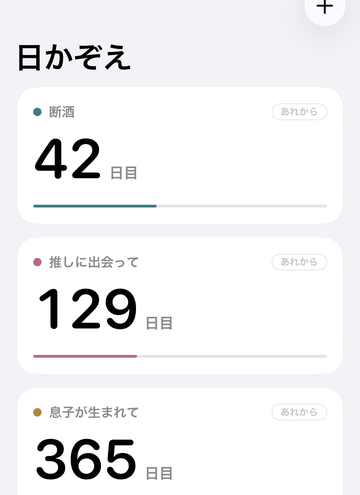
JAPANESE ONLYCounts the days since a date that mattered, or the days left until one that's coming. It sits on the Home Screen and the Lock Screen as a widget, handles anniversaries that come round every year, and lets you start counting from partway through. No ads and no subscription.
- Home Screen and Lock Screen widgets
- Handles anniversaries that come round yearly
- No ads, no subscription
Asset Sim
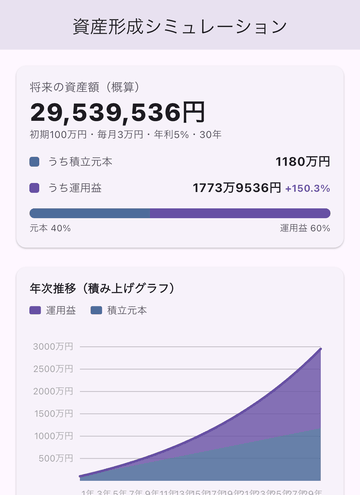
資産形成シミュ · JAPANESE ONLYA savings calculator. Put in what you set aside each month and the return you want to assume, and it charts how the balance compounds and how long it lasts once you start drawing it down. The figures are rough — tax and fees are left out — and none of it is investment advice.
- Charts compounding on a monthly contribution
- Follows the balance as you draw it down
- Rough figures; tax and fees left out
Dokotometakke
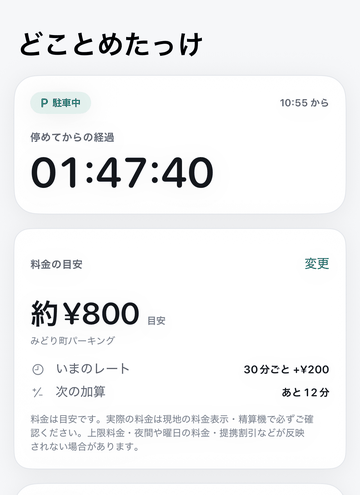
JAPANESE ONLYRemembers where you left the car. One tap saves the spot, and from then on you can pull the place up on a map and see how long the car has been there alongside a rough figure for what the parking will cost — in the app and on a Home Screen widget. The figure is an estimate only; the sign and the machine on site have the last word. Parking records stay on the phone.
- One tap saves where you parked
- Elapsed time and an estimated fee, on a widget
- Parking records never leave the phone
Benkyobako
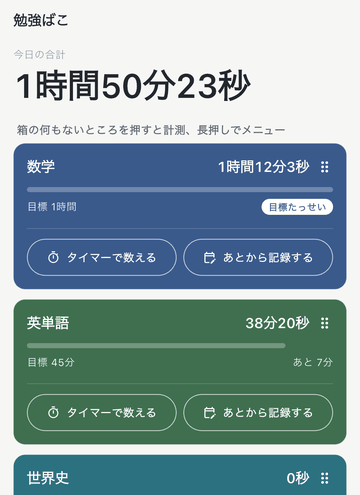
JAPANESE ONLYA study timer built around boxes — one per subject or textbook. Tap a box and it starts counting; tap it again and the time is filed away. You can also type a session in afterwards, or set a length and let it count down. A calendar and running totals show how much has piled up. Study records stay on the phone.
- Tap a box to start counting
- A calendar and totals to look back on
- Study records never leave the phone
Sumadome
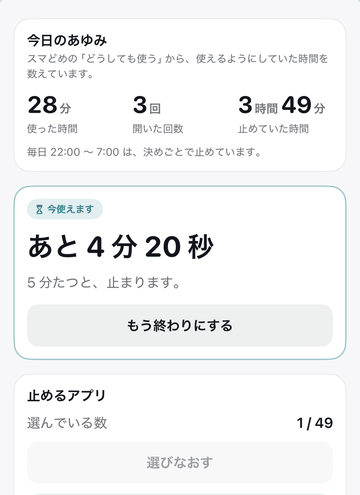
JAPANESE ONLYA pause in front of the apps you reach for without thinking. Pick the apps and the sites you want held back, and a blocking screen appears when you try to open one. If you do need it, you first see how long you have already spent today, then decide up front how many minutes to take. There is no extend button. A single button at the bottom of the settings unblocks everything again, any time. Records stay on the phone.
- Holds back the apps and sites you picked
- You decide the minutes before you start
- Records never leave the phone
Nekopata Clock
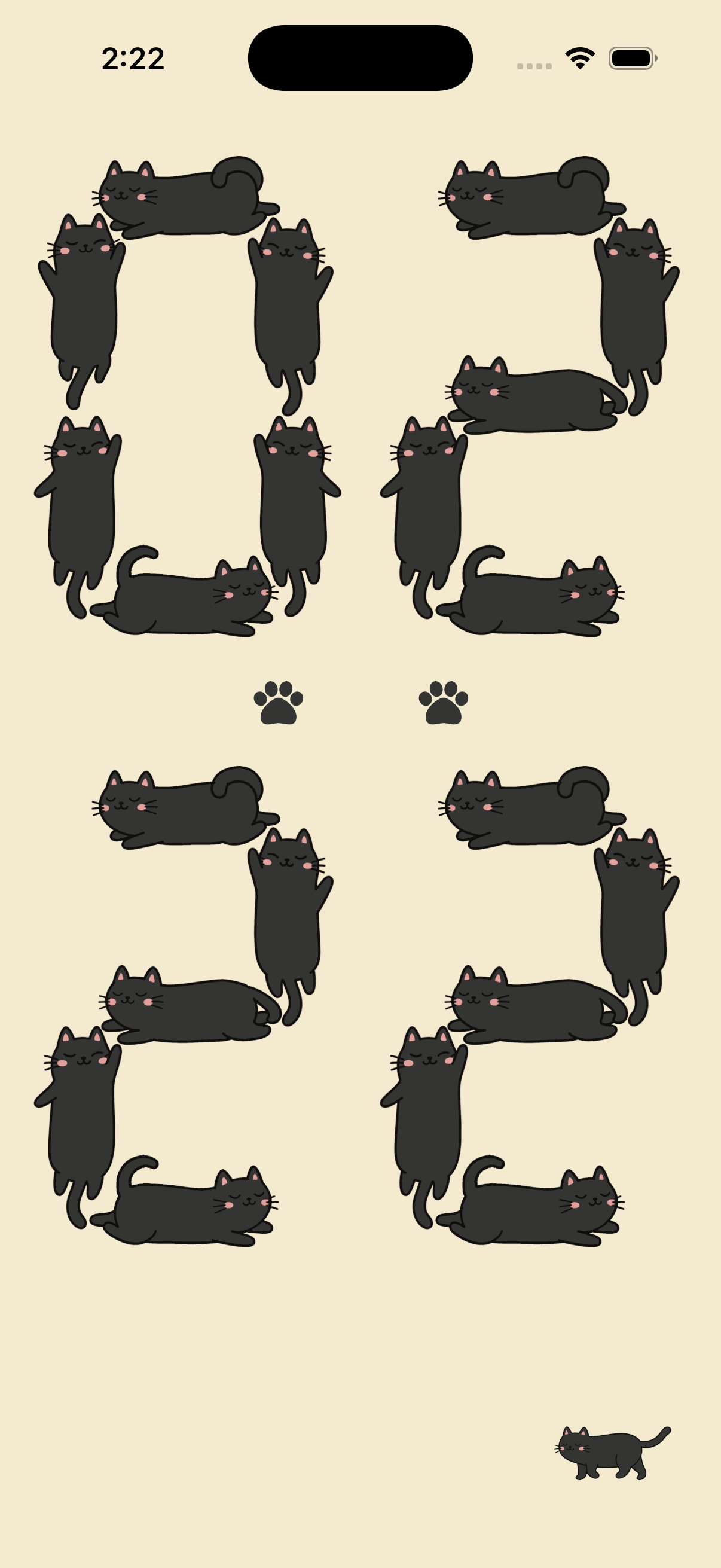
JAPANESE ONLYA flip clock whose digits are made of cats. Switch between 12-hour and 24-hour time. The black cats are free to use; white and dark brown cats are available as colour options.
- Cats form the clock digits
- Switch between 12-hour and 24-hour time
- Choose a cat colour
Mac apps
1 macOSScrollane
ENGLISH & JAPANESEWindows-style middle-click autoscroll for the Mac. Click the middle mouse button once and then just move the mouse to scroll. It needs a mouse with a middle button — trackpads and the Magic Mouse have nothing to hook into. Free.
- Middle-click once, then move the mouse
- Sits in the menu bar and works in almost every app
- Downloaded straight from the site
The Mac apps are all free. There's no account to make and no licence key to type in.
Web services
1 WebUchinoko Ehon
JAPANESE ONLYPicture books starring your own child, delivered through LINE. You register their name and how they look, and each book arrives with narration you can play back. Books on the subscription are written from scratch every time; the free sample book takes a story prepared in advance and puts your child's name into it.
- Books starring your own child, sent over LINE
- Narration you can play back
- Subscription books are written from scratch
Writing
1 Blogseiji.tokyo
JAPANESE ONLYA daily blog about Japanese domestic politics. It doubles as a test of how much of the writing pipeline can be automated end to end. Sources are limited to first-hand reporting from the major newspapers.
- Japanese politics, covered every day
- Sources limited to first-hand reporting
- A testbed for automating the writing
Built alone, with an AI at the desk.
Design, implementation and the checks before release all happen in conversation with an AI. A person decides, the AI writes, and a person checks it again. That order is the part I don't let slip.
Decide
What to build, how far to take it and what to leave out are settled first and written down in plain prose. That part stays with me.
Build
The implementation goes back and forth with the AI — design, code, tests, again — until the thing actually runs.
Check
Before anything ships, every line of text on screen is read by a person, and anything headed for a store is used on a real device first.
Recently shipped
What went out, and when. Dates are Japan time.
Last updated: 16 October 2026
- Black Cat Soiree Tarot Reading: Not yet available (returned in review)iOS
- Black Cat Soiree Tarot Reading: In reviewiOS
- Zombie Defense Corps: Available on the App StoreiOS
- Zombie Defense Corps: In reviewiOS
- Zombie Defense Corps support and privacy information prepared Guides are available in Japanese and English. The app is now available on the App Store. iOS
- GymStamp 1.2.4 submitted to the App Store Double-tap a calendar date to open that day's workout screen. A newly picked exercise now starts from the first set of your previous workout. Waiting on review. iOS
- Nekopata Clock 1.0 released on the App Store The iOS flip clock, whose digits are made of cats, is live. The Android version is in preparation. iOS
- Dokotometakke 1.0.2 submitted to the App Store The app itself is unchanged from the previous build. The store listing had no marketing website address, and this build exists to fill that field in. It is waiting for review. iOS
- Hikazoe 1.1.0 on the App Store Cleared review and is live. Mostly widget fixes: a placeholder count no longer shows on a fresh install with no entries, and the day count could drift by one when travelling west of Japan. The store screenshots have been redrawn too. iOS
- Sumadome 1.0.1 on the App Store Cleared review and is live. The blocking screen reads more clearly, and the way out — when you decide you do want the app — is easier to find. The store screenshots are new as well. iOS
- Hikazoe 1.1.0 submitted to the App Store Mostly widget fixes: a placeholder count no longer shows on a fresh install with no entries, and the day count could drift by one when travelling west of Japan. The store screenshots have been redrawn too. It goes live once review clears. iOS
- Shisan Keisei Simu 1.0.9 on Google Play The build already out on iOS has now rolled out to Android. The advanced settings cover iDeCo (contributions, payout method and a rough tax figure), a crash year, and different returns for different stretches of time. The annual NISA allowance is counted over the real calendar year, January to December, and the interface has been redrawn. Android
- Dokotometakke 1.0.1 on the App Store The build submitted on 8 September. The app itself is unchanged; the store screenshots have been redrawn. iOS
- Benkyobako 1.0.1 on the App Store The build submitted on 8 September. The app itself is unchanged; the store screenshots have been redrawn. iOS
- GymStamp 1.2.3 on the App Store The build submitted on 8 September. The app itself is unchanged; the store screenshots have been redrawn. iOS
- GymStamp 1.2.3 submitted to the App Store The app itself is unchanged; the store screenshots have been redrawn. Waiting on review. iOS
- Dokotometakke 1.0.1 submitted to the App Store The app itself is unchanged; the store screenshots have been redrawn. Waiting on review. iOS
- Benkyobako 1.0.1 submitted to the App Store The app itself is unchanged; the store screenshots have been redrawn. Waiting on review. iOS
- Shisan Keisei Simu 1.0.9 on the App Store The build submitted on 6 September. The advanced settings now cover iDeCo (contributions, payout method and a rough tax figure), a crash year, and different returns for different stretches of time. The annual NISA allowance is counted over the real calendar year, January to December, and the interface has been redrawn. The Android version was still 1.0.7 at that point. iOS
- Shisan Keisei Simu 1.0.9 submitted to the App Store, Google Play listing refreshed The advanced settings now cover iDeCo (contributions, payout method and a rough tax figure), a crash year, and different returns for different stretches of time. The annual NISA allowance is counted over the real calendar year, January to December. The interface has been redrawn. The iOS build is waiting on review; the Play listing has a new description and new screenshots. iOS / Android
- Sumadome 1.0.1 submitted to the App Store The blocking screen reads more clearly, and the way out — when you decide you do want the app — is easier to find. The store screenshots are new as well. Waiting on review. iOS
- Benkyobako for Android on Google Play Version 1.0.0, the build submitted for review on 19 August. The same box-based study timer as the iOS app: a box per subject, tapped to start counting. Android
- GymStamp 1.2.2 on the App Store, submitted to Google Play Weights can now be logged in kilograms or pounds. You pick the unit you normally use in settings, and you can switch it right where you type a weight. Anything already logged keeps the unit it was written in. The Android version will go live automatically once review clears. iOS / Android
- GymStamp 1.2.1 on the App Store The usability round submitted on 25 August. Workout entries now save the instant you write them. iOS
- GymStamp 1.2.1 submitted to the App Store A round of usability fixes. Workout entries now save the instant you write them. Waiting on review. iOS
- Sumadome released on the App Store Version 1.0 for iOS. Pick the apps and sites you want held back, and you decide the minutes before you start. iOS
- Sumadome submitted to the App Store A pause in front of the apps you reach for without thinking. Waiting on review. iOS
- Benkyobako for Android submitted to Google Play The same box-based study timer as the iOS app. Waiting on review. Android
- GymStamp 1.2.0 on the App Store This is the version that lets you log the exercise, weight and reps on a day you stamped. The same 1.2.0 is out on Google Play. iOS
- Dokotometakke on the App Store Version 1.0 for iOS. One tap saves where you parked, and the map brings it back later. iOS
- Benkyobako on the App Store Version 1.0.0 for iOS. Make a box per subject and it records the time you study. iOS
- GymStamp 1.2.0 submitted to the App Store and Google Play You can now log the exercise, weight and reps on a day you stamped. Waiting on review. iOS / Android
- GymStamp for Android on Google Play Version 1.1.1. Same as the iOS app: press the button at the gym and it's recorded. Android
- Benkyobako submitted to the App Store A study timer that records time per subject. Waiting on review. iOS
- Asset Sim 1.0.8 submitted New support and privacy pages. Nothing about the maths or the app itself has changed. iOS
- Dokotometakke submitted to the App Store Waiting on review. The link goes up once it's approved. iOS
- Asset Sim 1.0.7 shipped Fixed the contributed-principal figure in the year-by-year view, and put ceilings on what you can type in. iOS
- GymStamp 1.1.0 shipped A new look modelled on a stamp book, and dark mode. iOS
- Hikazoe on the App Store Version 1.0.0 for iOS. On 1 August, 1.0.1 added reordering and a confirmation before deleting. iOS
- Scrollane 1.0.0 released Free to download for macOS. macOS
- GymStamp on the App Store Version 1.0.0 for iOS. Android is still in progress. iOS
- Asset Sim 1.0.5 shipped Added the principal-and-return breakdown and a stacked chart. iOS